Installation of a Wireless Smart Dimmer Anywhere Companion Switch for Multi-Location Control
Wireless Smart Dimmers Anywhere Companion
The wire-free smart dimmer anywhere companion designed by Leviton is a modern solution for flexible lighting control. It works as a remote dimmer that can be placed anywhere without running new wires. This makes it ideal for locations where traditional multi-way wiring is difficult or not available.
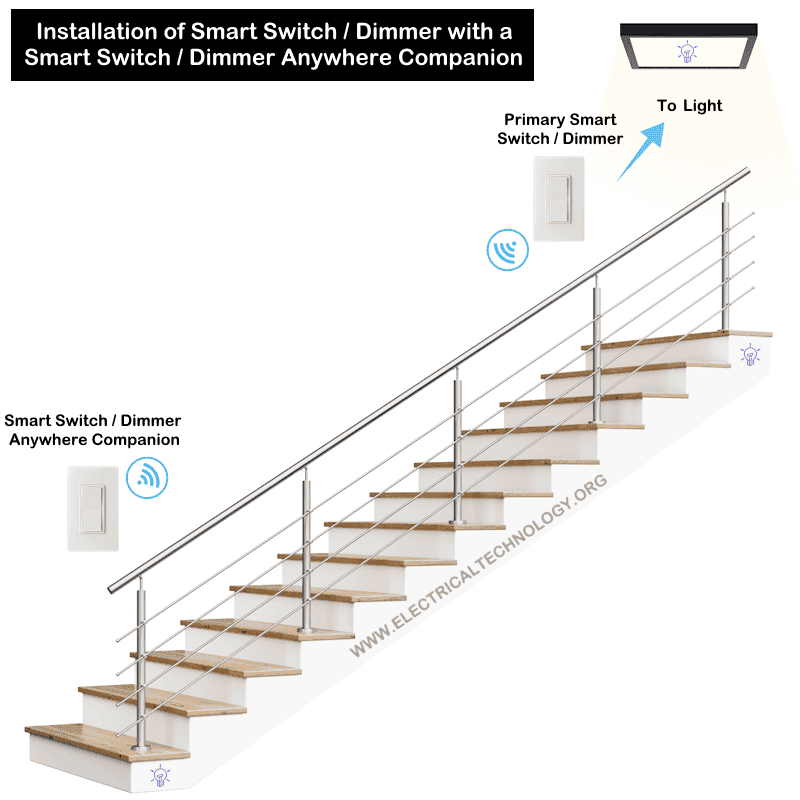
It pairs wirelessly with a primary smart dimmer or switch to provide ON/OFF, DIM/Bright or fan speed control from multiple locations. This smart device does not directly control the load, it sends signals to the main smart device. This way, it can be used to control the lighting from an additional location without using extra wires.
The smart dimmer companion can be used and paired with Decora smart devices for 3-way, 4-way, 5-way or multi-way lighting control. This allows easy creation of 3-way or multi-location switching without complex wiring.
The device is powered by a long-life battery and simple to install and use. It can be mounted on a wall or placed in an existing wall box. With its clean design and wireless operation, it offers a convenient and flexible way to expand lighting control in modern smart homes.
Click image or open in a new tab to enlarge
Good to Know:
- Smart dimmer anywhere companion (DAWDC) is compatible to wirelessly pair with smart devices by Leviton such as smart dimmers (D36HD, DW6HD, DH6HD, D26HD, DN6HD & D2710), motion sensing dimmers (D2MSD), fan speed controller (D24SF), smart phase selector (D2ELV), mini plug-in switches and dimmers (D23LP ) and MLWSB for 3-way and multi-way control.
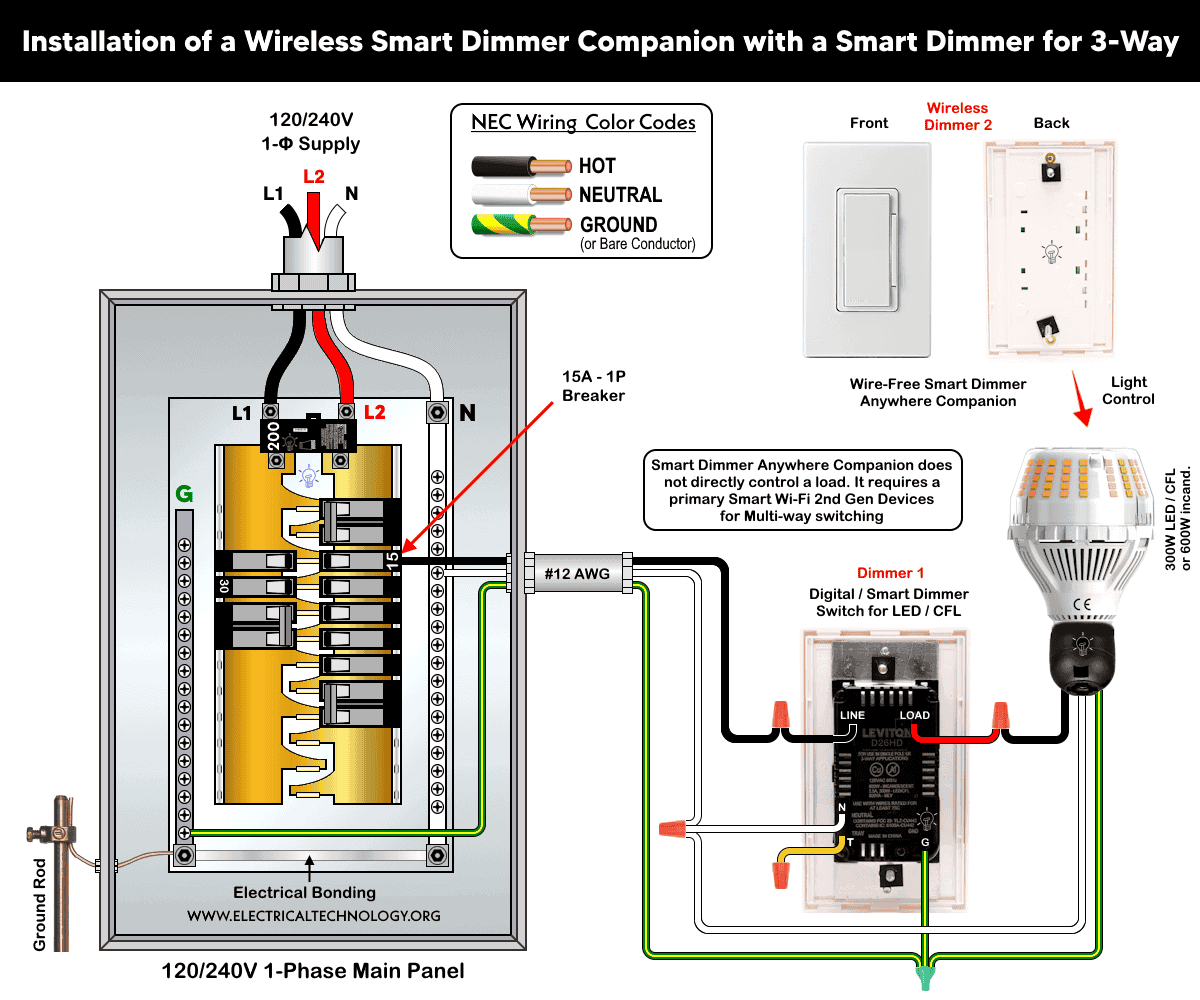
- Smart Dimmer Anywhere Companion does not directly control a load. It requires primary smart Wi-Fi 2nd Gen devices for multi-way switching.
- It offers wire-free connection and can be mount anywhere on the wall or fix in the wall switch box with other smart devices for 3-way, 4-way, 5-way or multi-way switching and control.
Installation of a Wireless Smart Dimmer Anywhere Companion
The Wire-Free Smart Dimmer Anywhere Companion is designed for fast, non-invasive installation. Unlike traditional 3-way wiring, it eliminates the need for traveler wires and electrical modifications. Hence, it makes it ideal for retrofits and smart home upgrades.
Click image or open in a new tab to enlarge
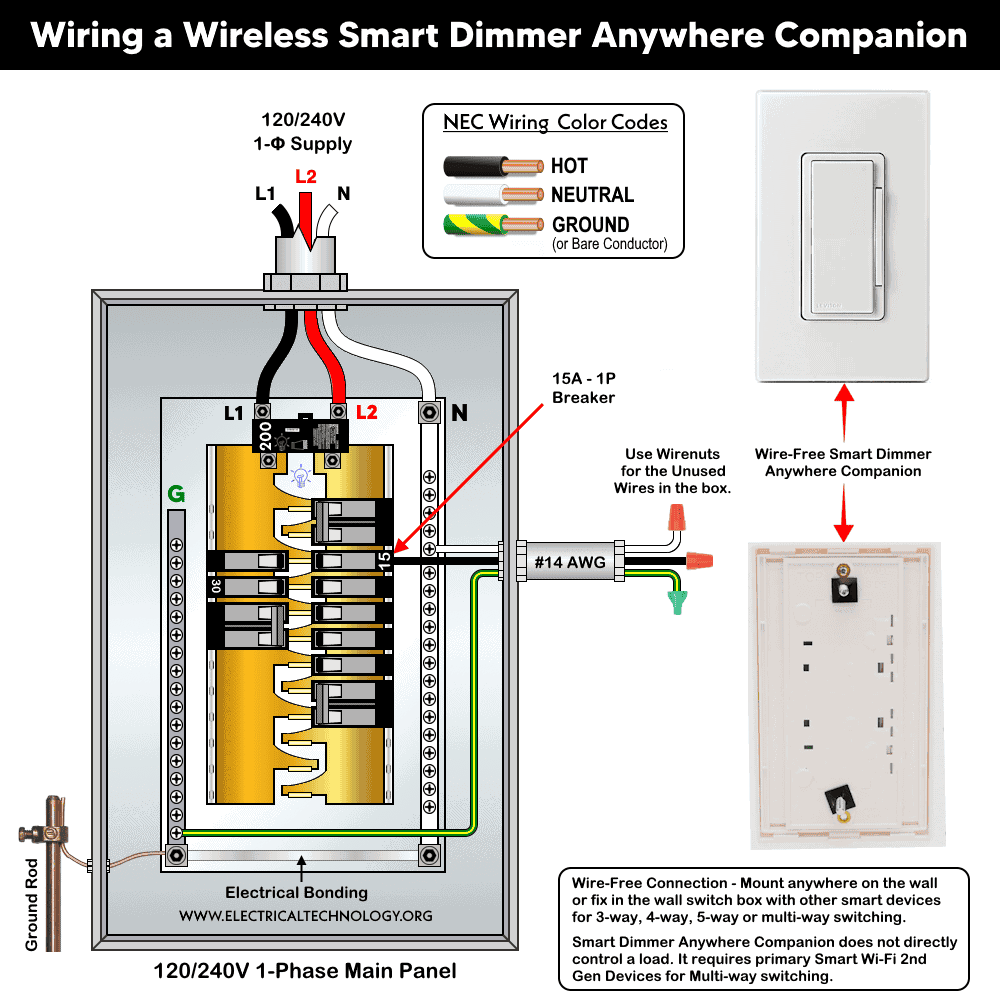
Before installation, make sure a compatible primary device (list given above) is already installed.
Here is how to wire a wire-free dimmer anywhere companion device:
Method 1: Surface Mount Installation
In this method, No drilling, wiring, or electrical work required. This is a quick installation where no wall box is available.
- Choose a clean, flat wall surface within wireless range (≤ 50 ft) in a specific location such as staircases, hallways, or large rooms with multiple entry points.
- Attach the provided adhesive tape to the back of the device and align with molded corner markings.
- Make proper orientation i.e. “TOP” and “WALL SIDE” markings.
- Mount the device by pressing firmly onto the wall. Ensure it is level and securely attached.
Method 2: Wall Box Installation
Even though it’s installed in a box for replacing an existing switch location, no wiring is required. As a safety measure, turn OFF power at the circuit breaker to prevent accidental contact with live conductors in the wall box.
- Align the device with the wall box screw holes.
- Use the provided screws to secure it.
- Tighten until snug (do NOT overtighten).
- Install a compatible wall plate if needed.
After installation, remove the battery tab to activate the switch. It uses two replaceable long life coin-cell battery (2 x CR2025).
Warning: Avoid metal boxes/plates as they can reduce RF signal and overall performance.
Click image or open in a new tab to enlarge
Pairing with Smart Device, Powering & Testing
The primary smart device will automatically pair with the Anywhere Dimmer Companion when it is in pairing mode and within the wireless RF range. Once paired, the Anywhere Dimmer Companion’s status LED will briefly turn solid green to indicate a successful connection.
The dimmer companion must be linked to a Decora® Smart switch, dimmer, or plug. To pair:
- After removing both pull tabs for each battery, press and hold the companion dimmer button. The status LED will flash Green which indicates it is ready to pair.
- Follow pairing steps on the primary smart device using My Leviton app.
You can pair up to 3 companions per primary device. After physical and setup installation, verify the anywhere companion device as follow:
- Top rocker press: Turn ON the light or connected load.
- Bottom rocker press: Turn OFF the lighting point.
- Double tap top: Max brightness.
- Dim/Bright bar: Adjust light level manually.
No Wi-Fi is required for basic pairing in many setups. The status LED shows paring, connectivity and OFF during normal operation.
To test the operation, press:
-
- Top rocker: ON
- Bottom rocker: OFF
Verify that the connected load responds correctly as per requirement. During operation, the status LED on the device Indicates:
- Green or No light: Normal operation
- Amber: Not connected to any smart device
- Red: Low battery
To rest to the factory default, press the top rocker for 14 seconds. The LED will flash amber and then quickly flash red. Release the rocker and the switch is restore to the factory default which means all the paired devices are unpaired.
Good to Know:
- NO Line, Load, Neutral, Traveler wiring, Wi-Fi, App or hub is required.
- The device does not connect directly to the light/load.
- It must be paired with a Decora® Smart Wi-Fi (2nd Gen or No-Neutral) primary device. It can be paired with up to three additional anywhere companions when used with smart Wi-Fi devices.
- Operates within 50 ft (15 m) of smart device via RF wireless communication (battery powered) using 2.4GHz network.
- Up to six anywhere companion devices can be paired with one smart Wi-Fi bridge MLWSB in accordance with smart no-neutral devices.
Instructions & Precautions
- Make sure to disconnect the power supply by switching OFF the breaker in the main panel before doing any electrical work.
- The wire length from smart switch to other companion device should not exceed 300 ft (90 meters).
- Smart devices are only suitable for indoor use, and should not be used for medical applications.
Disclaimer:
- The author will not be liable for any losses, injuries, or damages from the display or use of this information or if you try any circuit in wrong format. So please! Be careful because it’s all about electricity and electricity is too dangerous. If you are unsure, contact a licensed electrician to do it according to the local area codes.
Resources:
Smart Devices Wiring Series
- How to Wire a Smart Switch in a 120/240V Load Center
- How to Wire 120/240V Smart Load Center with Smart Breakers
- How to Wire a Smart Breaker in a Smart 120/240V Panel
- How to Wire a Smart GFCI Breaker in a 120/240V Smart Panel
- How to Wire Smart AFCI/GFCI Breaker in a Smart Load Center
- How to Wire a 15A Wi-Fi Smart Outlet in a Smart Panel
- How to Wire 15A and 20A Wi-Fi Smart GFCI Outlets
- How to Wire Z-Wave Smart Switch, Dimmer & Fan Speed Controller
- How to Wire a Digital and Wi-Fi Smart LED Dimmer Switch
- How to Wire a Smart Switch Companion with a Smart Switch
- Wiring a Smart Dimmer Switch Companion with a Digital Dimmer
Wiring Standard GFCI & Breakers
- How to Wire a 1-Pole Breaker
- How to Wire a 2-Pole Breaker
- How to Wire a 3-Pole Breaker
- How to Wire a 1-Pole GFCI
- How to Wire a 2-Pole GFCI
- How to Wire a 3-Phase, 3-Pole GFCI
- How to Wire a Tandem Breaker
- How to Wire GFCI Circuit Breakers
- How to Wire an AFCI Breaker
Wiring General Outlets & GFCI/AFCI Receptacles
- How to Wire an Outlet Receptacle? Socket Outlet Wiring Diagrams
- How to wire a GFCI Outlet?
- How to Wire an AFCI Outlet?
- How to a Wire 3-Way Combination Switch and Grounded Outlet?
- How to Wire a 15A – 125V Outlet – NEMA 5-15 Receptacle
- How to Wire a 20A – 125V Outlet – NEMA 5-20 Receptacle
- How to Wire a 15A – 250V Outlet – NEMA 6-15 Receptacle
- How to Wire a 20A – 250V Outlet – NEMA 6-20 Receptacle
- How to Wire a 50A – 125/250V Outlet – NEMA 14-50 Receptacle
Switches Wiring
- How to Wire Single Pole, Single Throw (SPST) as 2-Way Switch?
- How to Wire Single Pole, Double Throw (SPDT) as 3-Way Switch?
- How to Wire Double Pole, Single Throw Switch? Wiring DPST
- How to Wire Double Pole, Double Throw Switch? Wiring DPDT
- How to Wire Double Switch? 2-Gang, 1-Way Switch – IEC & NEC
- How to Wire 4-Way Switch (NEC) or Intermediate Switch as 3-Way (IEC)?
- How to Wire Auto & Manual Changeover & Transfer Switch – (1 & 3 Phase)
Sizing Breakers, Wires & Panels
- How to Size a Load Center, Panelboards and Distribution Board?
- How to Determine the Right Size Capacity of a Subpanel?
- How to Find the Right Wire Size for 100A Service 120V/240V Panel?
- How to Size a Circuit Breaker?
- How to Find the Proper Size of Wire & Cable In Metric & Imperial Systems
- How to Size a Breaker and Wires in AWG with EGC for Load?
- How to Size Service-Entrance Conductors and Feeder Cables?
- How to Size Feeder Conductors with Overcurrent Protection
- How to Size a Branch Circuit Conductors with Protection?
- How to Size Equipment Grounding Conductor (EGC)?
- How to Size Grounding Electrode Conductor (GEC)?
- How to Size Main Bonding Jumper (MBJ)?
- How to Size Motors FLC, HP, Voltage, Breaker Size and Wire Size
- What is the Correct Wire Size for 100A Breaker and Load?
- What is the Right Wire Size for 15A Breaker and Outlet?
- What is the Suitable Wire Size for 20A Breaker and Outlet?
Finding the Number of Breakers/Outlets in a Circuit
- How to Determine the Number of Circuit Breakers in a Panelboard?
- How to Find the Number of Outlets on a Single Circuit Breaker?
- How to Find Voltage & Ampere Rating of Switch, Plug, Outlet & Receptacle
- How to Calculate the Number of Fluorescent Lamps in a Final Sub Circuit?
- How to Calculate the Number of Incandescent Lamps in a Final Sub Circuit?
- How to Determine the Number of Lighting Branch Circuits?
- How to Determine the Number of Branch Circuits? – 3 Ways
- How to Find the Number of Lights on a Single Circuit Breaker?
-
 How to Wire and Use Tesla Gen 3 Mobile Connector Charger
-
 How to Wire 48A Level 2 Dual Port EV Charging Station
-
 How to Wire Smart Electric Vehicle Charging Station – 32A/80A
-
 How to Wire ChargePoint Home Flex Charger for Every EV
-
 How to Wire an EV Wall Charger – Hardwired and Plug-in
-
 How to Wire AC Level 2 EV Smart Breaker Charger – 40A/32A