How to Wire a Smart Breaker in a Smart 120/240V Panel
How to Wire 1-Pole & 2-Pole Smart Breakers in a 120/240V Smart Load Center
If you want to upgrade your home wiring, the smart circuit breakers and load centers are the true legends which makes your home even smartest. Leviton 2nd Gen Smart Circuit Breaker represents a new generation of intelligent protection devices that go far beyond basic fault interruption.
Integrated with the My Leviton app and compatible with the Leviton Load Center, these breakers provide remote ON/OFF control, real-time energy monitoring, circuit-level data analytics, scheduling capabilities, and firmware updates.
In the following wiring guide, we will show you how to upgrade or install a new 1-pole and 2-pole smart circuit breaker in a smart 120/240V main residential panel by Leviton. Before starting the wiring tutorial, let’s first explain what smart circuit breakers are, their advantages and how they differ from standard (ordinary) breakers.
What is a Smart Circuit Breaker?
Smart breakers are totally different than the standard breakers. Traditional thermal-magnetic breakers are purely electromechanical devices designed to trip under overload or short-circuit conditions, offering no visibility, automation, or remote access.
On the other hand, Leviton’s 2nd Gen Smart Circuit Breakers combine protection hardware with embedded electronics and communication modules. They allow homeowners to remotely ON/OFF the breaker and control circuits, configure time-based scheduling, receive trip notifications, detect anomalies, and even classify loads as essential or nonessential in solar, battery, wind or generator-backed systems configured with automatic transfer switch (ATS).
During backup power events, nonessential loads can be automatically shed, which eliminates the need for a separate essential loads panel in certain installations. Additionally, patented reset lockout technology enhances safety by preventing reset if ground or arc fault conditions remain present, while line-side powered LEDs provide continuous trip-status indication.
Smart breakers are available in 1-pole and 2-pole configurations for different application such as standard thermal, GFCI, AFCI, surge protection, dual-function protection (GFCI/AFCI) and GFPE. The 1P & 2P Plug-on smart breakers are available in 15A to 60A and support both 120/208V and 120/240V applications. When paired with a Whole Home Energy Monitor (LWHEM-2), they deliver granular visibility into energy consumption. It is capable to display aggregate usage, per-circuit data, and past usage (history). That’s how it transforms a conventional electrical panel into a connected energy management system.
The advantages of smart circuit breakers extend across safety, energy efficiency, installation flexibility, and system intelligence. From an operational standpoint, users can proactively reduce energy waste by scheduling high-demand loads (such as water heaters or pumps) to operate only when necessary.
From a safety perspective, advanced GFCI/AFCI protection with clear diagnostic indicators improves fault identification and compliance. Installation is streamlined through a plug-on design that allows load centers to be wired during rough-in without breakers installed, accelerating project timelines.
Most importantly, smart breakers convert the electrical distribution panel into an active control hub. It offers and delivers actionable data, automation, and remote management that conventional breakers simply cannot provide.
Rating & Features of a Smart Breakers
- Name: 2nd Gen Smart Branch Circuit Breaker
- Poles: 1-Pole & 2-Poles – 2 & 3 Wires with Ground
- Voltage: 120V, 120/208V & 120/240V – Single-Phase AC Supply – 60 Hz
- Current: 15A to 60A
- Short Circuit Current Rating: 10kA
- Wiring: Plug-On
- Control = Manual & Remote ON/OFF & Scheduling
- LED Indicator = Status indication even when breaker is off
- Compatibility: My Leviton App (To be used with Leviton Smart panel and requires the LWHEM Hub)
Wiring 1P & 2P Smart Breakers in a Smart Load Center
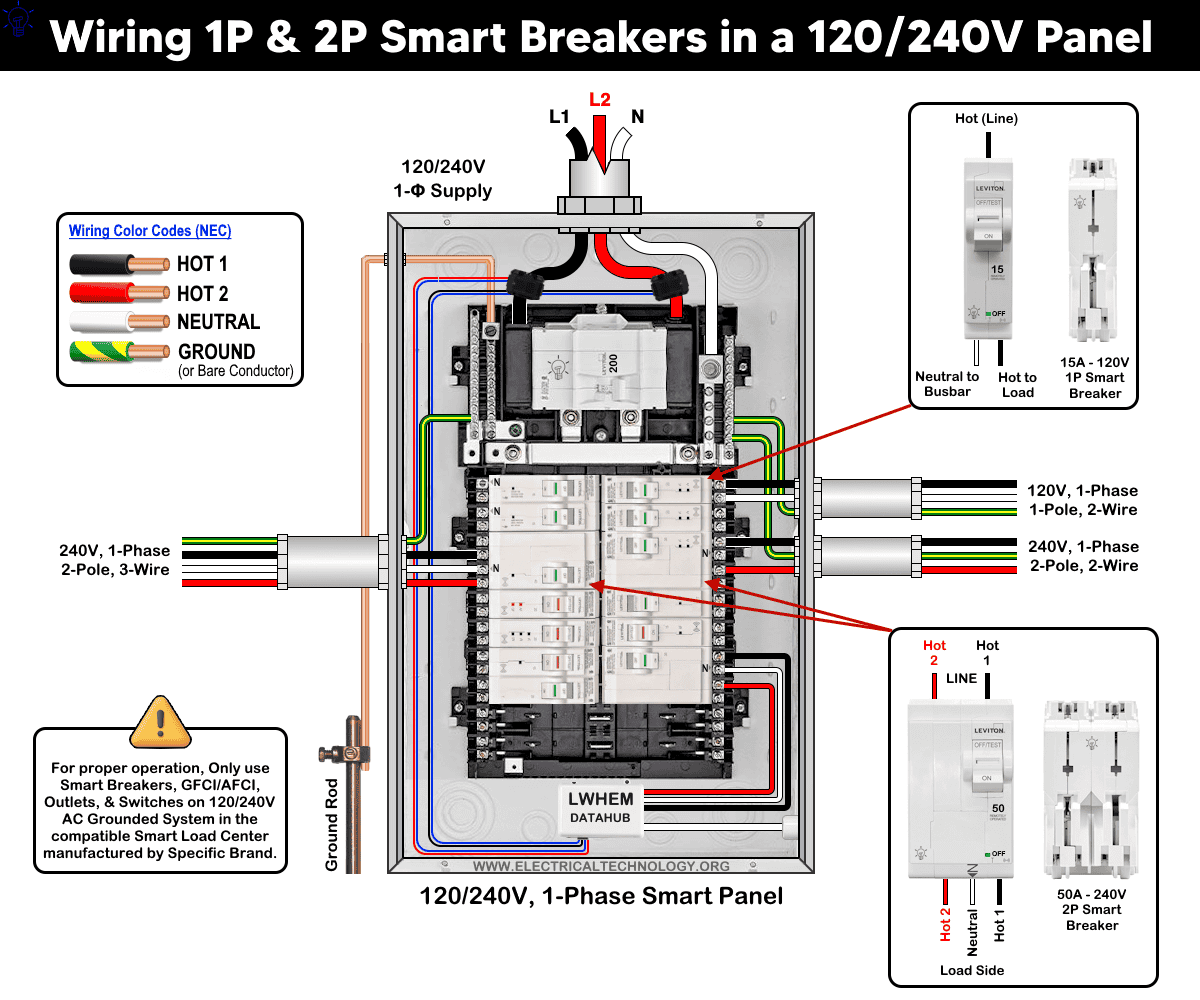
The following wiring diagram shows a 1-pole 15A, 120V (LB115-ST) and 20A and 50A, 2-pole 120/240V smart breakers (LB220-ST & LB250-ST) in a smart 120V/240V load center by Leviton (LP220-BPD)
As shown in the fig, the smart breakers have the following wiring configuration
- 15A/120V – 1 Pole, 2-Wires, 1-Phase
- 20A/240V – 2 Pole, 2-Wires, 1-Phase
- 50A – 120/240V – 2 Pole, 3-Wires, 1-Phase
To wire a smart breaker in the panel, select the proper size of breaker and follow the following simple steps.
- Move the main breaker handle to OFF to disconnect the power to the panelboard and Confirm power is off before touching anything.
- Unscrew and remove the panel cover so you can access breaker slots and bus bars.
- Before installing the breaker, ensure its handle is in the OFF position.
- Install the breaker by snapping the breaker into the panel by aligning the hooks and guides with the panel bus and pressing until it seats fully.
- Reinstall all panel covers and doors securely (do not energize the panel without them.)
- Turn ON the main breaker to restore power, then switch on the new smart breaker.
- If installing 2nd-gen smart breakers, place the supplied “Remotely-operated circuit breaker” label where it’s visible without removing the cover.
- Finally, use the My Leviton App and the Getting Started Guide to add and enable the breaker’s smart functions.
Click image or open in a new tab to enlarge
The following table shows the troubleshooting and diagnostic of smart breakers using the LED status indicator on it.
| Smart Breaker LED Status Indicator | ||
| Breaker Handel | ON/OFF LED | Device Status |
| Green | OFF | ON |
| Green | ON – Solid | Remote OFF |
| Red | OFF | Short-circuit / Overload Trip |
| White | OFF | Manual OFF |
Wiring Smart Breakers for Standard and Smart Outlets
The following wiring diagram shows that a 1-pole, 15A, 120V smart breaker is used to feed a 15A/125V – NEMA 5-15 smart outlet (D215R); a 20A/240V smart breaker is used to feed a 20A/250V standard outlet (NEMA 6-20); and a 50A, 2-pole, 120/240V smart breaker is used to feed a 50A, 125/250V (NEMA 14-50) EV-rated receptacle in a smart 120V/240V load center by Leviton.
As the wiring method is same as mentioned above, connect the load wires to the breaker as follows:
- Strip both the load power (hot) and load neutral conductors for termination to the lengths specified on the back side of the device (e.g. 0.4 inch (1cm). Don’t forget to connect the ground wire from the ground bar to the ground terminal of outlets/receptacles or load points.
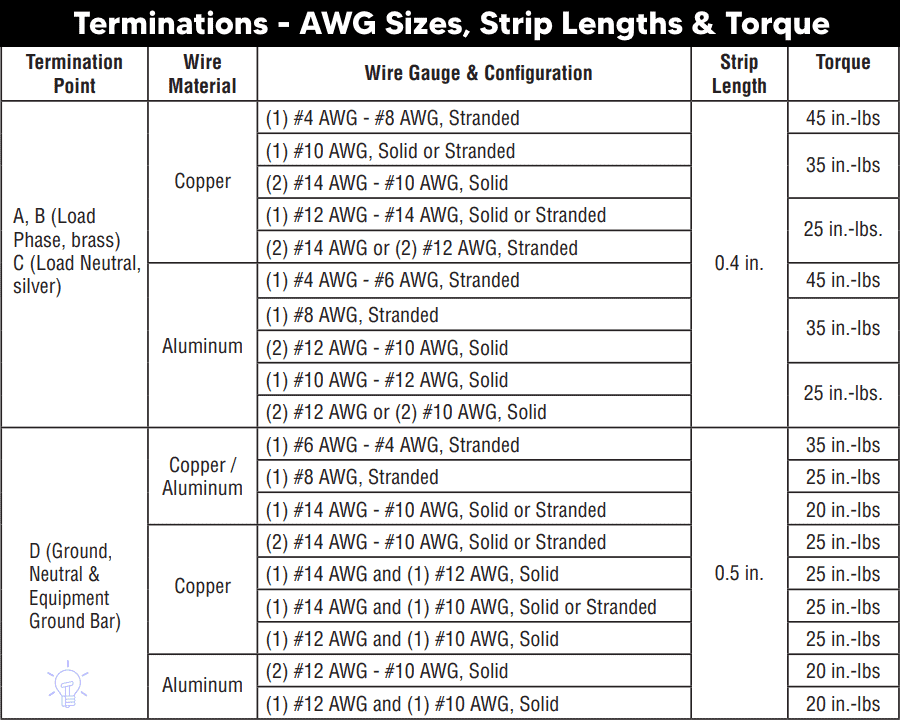
- Insert and tighten the wires into the correct breaker terminal lugs as per torquing levels (e.g. 25 in.-lbs for #12 to #14AWG, and 45 in.-lbs for #4 to #6AWG) motioned on the device as follow:
- Hot (Black as load Line) connects to the Brass Terminal
- Neutral (White as load Neutral) connects to the Silver Terminal
Click image or open in a new tab to enlarge
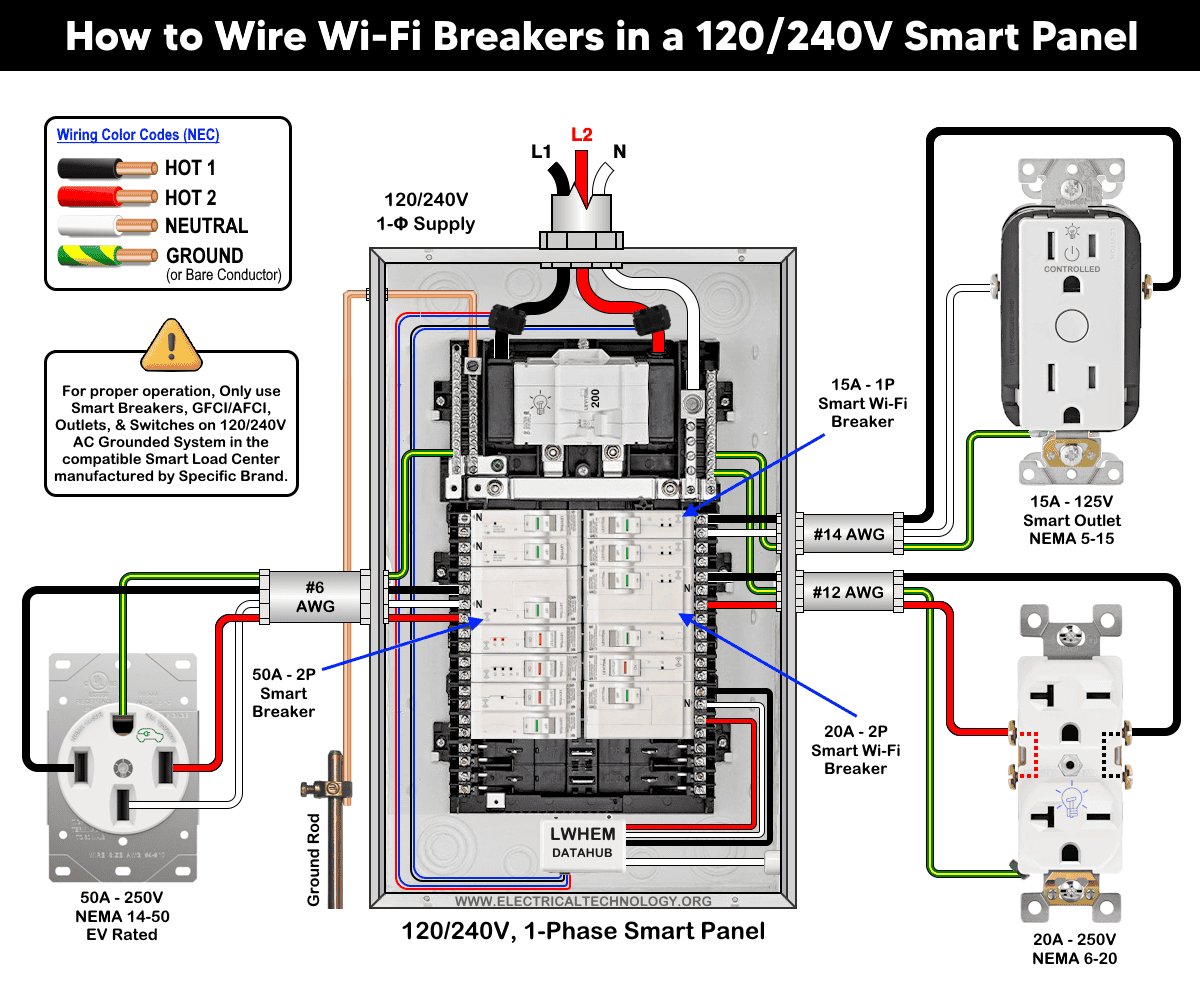
For the given outlets and receptacles, use the following wire sizes based on NEC Table 310.16.
- Use 14AWG for 15A outlet & breaker
- Use 12AWG for 20A outlet & breaker
- Use #6 AWG for 50A receptacle & breaker
Wiring a Smart Breaker with GFCI Protection in a Standard Panel
If you don’t have a smart panel and want to use a smart breaker in a standard panel, Eaton offers a solution. The plug-on 2-pole Wi-Fi breaker can be used to control the device remotely without spending more money or upgrading to a new panel.
As shown in the wiring diagram, a 2-pole, 120/240V smart breaker with GFCI protection (SBR260WGF – AbleEdge BR smart breaker) is used for a 60A, 125/250V receptacle (NEMA 14-60) in a standard 120V/240V panel.
Click image or open in a new tab to enlarge
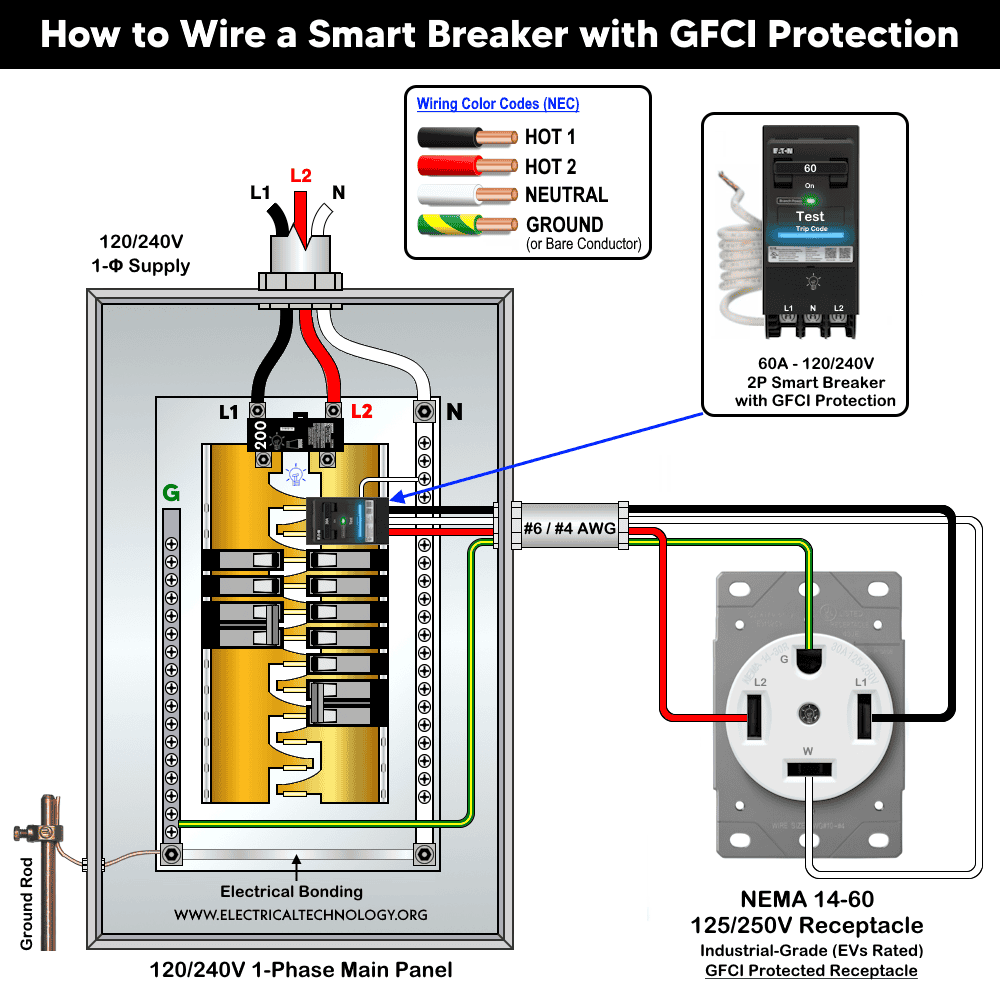
The wiring method is similar to wiring a 2-pole GFCI breaker in a panel. Mount the breaker onto the main busbars. As illustrated in the following figure, connect the built-in white pigtail to the neutral busbar in the main panel. Connect the #6AWG or #4AWG load conductors from the breaker to the receptacle as follow:
- Hot 1 (black),
- Hot 2 (red),
- Neutral (white)
- Ground (bare or green).
This is a perfect choice when you want:
- GFCI protection for EV charging and a rated receptacle.
- Control of EV charging or other high-load appliances through a smartphone with an active Wi-Fi connection.
To control the smart breaker through a Wi-Fi network from anywhere, download the Eaton Brightlayer Home app (available on iOS and Google Play Store) and connect Eaton’s smart breaker with the Brightlayer Home app (step by step guide).
Termination Chart:
The following chart provides wire sizes (AWG), strip lengths, and torque values for proper termination of smart breakers used in Leviton smart electrical panels. If your panel or breaker is from a different brand, refer to the manufacturer’s user manual or consult a licensed electrician.
Precautions:
- Do not use a 15A breaker for 20A load circuits. Doing so may trip unnecessarily under normal usage (e.g., multiple devices drawing 16A).
- Do not use a 20A breaker for 15A load circuits. Doing so will will allow the breaker up to 20A of current to flow, which exceeds the wire’s capacity as well as won’t be able to protect the 15-Amp branch circuit conductors.
- Do not use 20A outlet on 15A circuit breaker. If more than one receptacle on the same circuit, you may allowed to use 15A outlet on 20A circuit breaker.
- It is code to use 15A outlet on 20A breaker (NEC 210.21(B)(2)), but it is not allowed to use 20A outlet on 15A breaker.
- While a 2-Pole 240V breaker can be used on 120V circuits (not a good practice), it is strictly prohibited to use a 1-pole breaker for 240V circuits.
- Do not use three phase breaker for single-phase and vice versa.
Resources:
Smart Devices Wiring Series
- How to Wire 120/240V Smart Load Center with Smart Breakers
- How to Wire a Smart GFCI Breaker in a 120/240V Smart Panel
Main Panels Wiring Tutorials
- How to Wire 120/240V Main Panel – Breaker Box Installation
- How to Wire 120V/208V, 1-Phase & 3-Phase Main Panel?
- How to Wire 120/208/240V High Leg Delta 1-Phase & 3-Phase Main Panel?
- How to Wire 277/480V, 1-Phase & 3-Phase Main Service Panel?
- How to Wire 347/600V, 1 and 3-Phase Main Service Panel?
- How to Wire a Subpanel? Main Lug Installation for 120V/240V
- How to Wire a Spa Panel Box for a Hot Tub using 2P GFCI & Breaker
- Single Phase Electrical Wiring Installation in Home – NEC & IEC
- Three Phase Electrical Wiring Installation in Home – NEC & IEC
- How To Wire a Single Phase kWh Meter – 120V/240V
- How to Wire a Three-Phase Meter? 120/208/240/277/347/480/600V
Wiring Smart / Standard GFCI & Breakers
- How to Wire a 1-Pole Breaker
- How to Wire a 2-Pole Breaker
- How to Wire a 3-Pole Breaker
- How to Wire a 1-Pole GFCI
- How to Wire a 2-Pole GFCI
- How to Wire a 3-Phase, 3-Pole GFCI
- How to Wire a Tandem Breaker
- How to Wire GFCI Circuit Breakers
- How to Wire an AFCI Breaker
Wiring Smart / General Outlets & GFCI/AFCI Receptacles
- How to Wire an Outlet Receptacle? Socket Outlet Wiring Diagrams
- How to wire a GFCI Outlet?
- How to a Wire 3-Way Combination Switch and Grounded Outlet?
- How to Wire a 15A – 125V Outlet – NEMA 5-15 Receptacle
- How to Wire a 20A – 125V Outlet – NEMA 5-20 Receptacle
- How to Wire a 15A – 250V Outlet – NEMA 6-15 Receptacle
- How to Wire a 20A – 250V Outlet – NEMA 6-20 Receptacle
- How to Wire a 50A – 125/250V Outlet – NEMA 14-50 Receptacle
Switches Wiring
- How to Wire Single Pole, Single Throw (SPST) as 2-Way Switch?
- How to Wire Single Pole, Double Throw (SPDT) as 3-Way Switch?
- How to Wire Double Pole, Single Throw Switch? Wiring DPST
- How to Wire Double Pole, Double Throw Switch? Wiring DPDT
- How to Wire Double Switch? 2-Gang, 1-Way Switch – IEC & NEC
- How to Wire 4-Way Switch (NEC) or Intermediate Switch as 3-Way (IEC)?
- How to Wire Auto & Manual Changeover & Transfer Switch – (1 & 3 Phase)
Sizing Breakers, Wires, and Panels
- How to Size a Load Center, Panelboards and Distribution Board?
- How to Determine the Right Size Capacity of a Subpanel?
- How to Find the Right Wire Size for 100A Service 120V/240V Panel?
- How to Size a Circuit Breaker?
- How to Find the Proper Size of Wire & Cable In Metric & Imperial Systems
- How to Size a Breaker and Wires in AWG with EGC for Load?
- How to Size Service-Entrance Conductors and Feeder Cables?
- How to Size Feeder Conductors with Overcurrent Protection
- How to Size a Branch Circuit Conductors with Protection?
- How to Size Equipment Grounding Conductor (EGC)?
- How to Size Grounding Electrode Conductor (GEC)?
- How to Size Main Bonding Jumper (MBJ)?
- How to Size Motors FLC, HP, Voltage, Breaker Size and Wire Size
- What is the Correct Wire Size for 100A Breaker and Load?
- What is the Right Wire Size for 15A Breaker and Outlet?
- What is the Suitable Wire Size for 20A Breaker and Outlet?
Finding the Number of Breakers/Outlets in a Circuit
- How to Determine the Number of Circuit Breakers in a Panelboard?
- How to Find the Number of Outlets on a Single Circuit Breaker?
- How to Find Voltage & Ampere Rating of Switch, Plug, Outlet & Receptacle
- How to Calculate the Number of Fluorescent Lamps in a Final Sub Circuit?
- How to Calculate the Number of Incandescent Lamps in a Final Sub Circuit?
- How to Determine the Number of Lighting Branch Circuits?
- How to Determine the Number of Branch Circuits? – 3 Ways
- How to Find the Number of Lights on a Single Circuit Breaker?
General Wiring Installation Tutorials:
- How to Toggle Electric Water Heater Between 120V and 240V?
- How to Wire 120V Water Heater Thermostat – Non-Simultaneous?
- How to Wire 240V Water Heater Thermostat – Non-Continuous?
- How to Wire 3-Phase Simultaneous Water Heater Thermostat?
- How to Wire Twin Timer for 120V/240V Circuits – ON/OFF Delay
- How to Wire ST01 Timer with Relay & Contactor for 120V/240V Motors?
- How to Wire Multifunction ON/OFF Delay Timer for 120V/240V Motors?
- Even More Residential Wiring Installation Tutorials