How to Wire Smart Scene Controller Switch
Wiring Installation of a Wi-Fi Smart Scene Controller Switch to Control Four Lighting Scenes
What is a Smart Scene Controller Switch
A smart scene controller switch is an advanced wall-mounted control device that combines a traditional light switch with programmable scene buttons to manage multiple lighting loads and smart devices from a single location.
Smart Scene Controller Switch – By Leviton
The Leviton Decora 2nd Gen smart Wi‑Fi scene controller switch (D2SCS‑1BW) replaces a standard switch and provides one main ON/OFF control for the connected load along with additional 3 buttons. The additional switches can be used to trigger customized lighting scenes such as “Movie Time” or “All Off.” It operates over Wi-Fi without requiring a hub and integrates with major smart home ecosystems such as Amazon Alexa, Google Assistant, Apple HomeKit, SmartThings, and Sonos.
This type of switch is designed for flexibility and automation, allowing users to assign multiple devices or rooms to a single button press through a dedicated mobile app.
The smart scene controller supports single-pole, 3-way, and multi-location configurations, which makes it suitable for complex lighting layouts. The 15A/120V switch can control various load types such as 5A LED/CFL, 1500W incandescent/halogen, and ¾ motor loads.
In addition, the switch with LED status feedback is customizable i.e. scheduling, voice control, and scene-based automation, Hence, it is a perfect choice with user-friendly interface for centralized and modern smart lighting systems.
Note:
- The smart scene controller switch by Leviton does not require a hub; however, for proper operation, it requires a neutral wire connection.
- The scene controller switch can be used for multi-switching control when used with other smart wired companion devices (such as DD0SR) or wireless anywhere companion switches (such as DAWSC, DAWDC)
Smart Scene Controller with Netatmo – By Legrand
A smart scene controller is a hardwired wall-mounted device designed to control multiple lighting scenes and smart devices from a single interface.
The adorne® (WNACB46) and radiant® (WNRCB46) wired smart scene controller with Netatmo by Legrand feature four programmable buttons. This feature allows users to activate customized scenes like “Relax,” “Entertain,” or “All Off” with a single touch.
These controllers operate through the Legrand Home + Control app, where scenes can be configured and managed. For smart control and operation, the switch requires a smart sateway with Netatmo to enable communication across the smart lighting system.
Designed for modern smart homes, these controllers install in a standard electrical box with wired connections including a neutral wire. It can integrate seamlessly with other smart switches, dimmers, and outlets within the Netatmo ecosystem.
These switches support voice control and automation through platforms like Amazon Alexa, Google Assistant, and Apple HomeKit over a dedicated mesh network. ,
In short, these smart scene controllers provide a centralized and efficient solution for advanced lighting control. With one-touch scene activation, app-based customization, and compatibility across residential and commercial environments, they are an ideal choice for modern home automation systems.
Wiring a Smart Scene Controller Switch
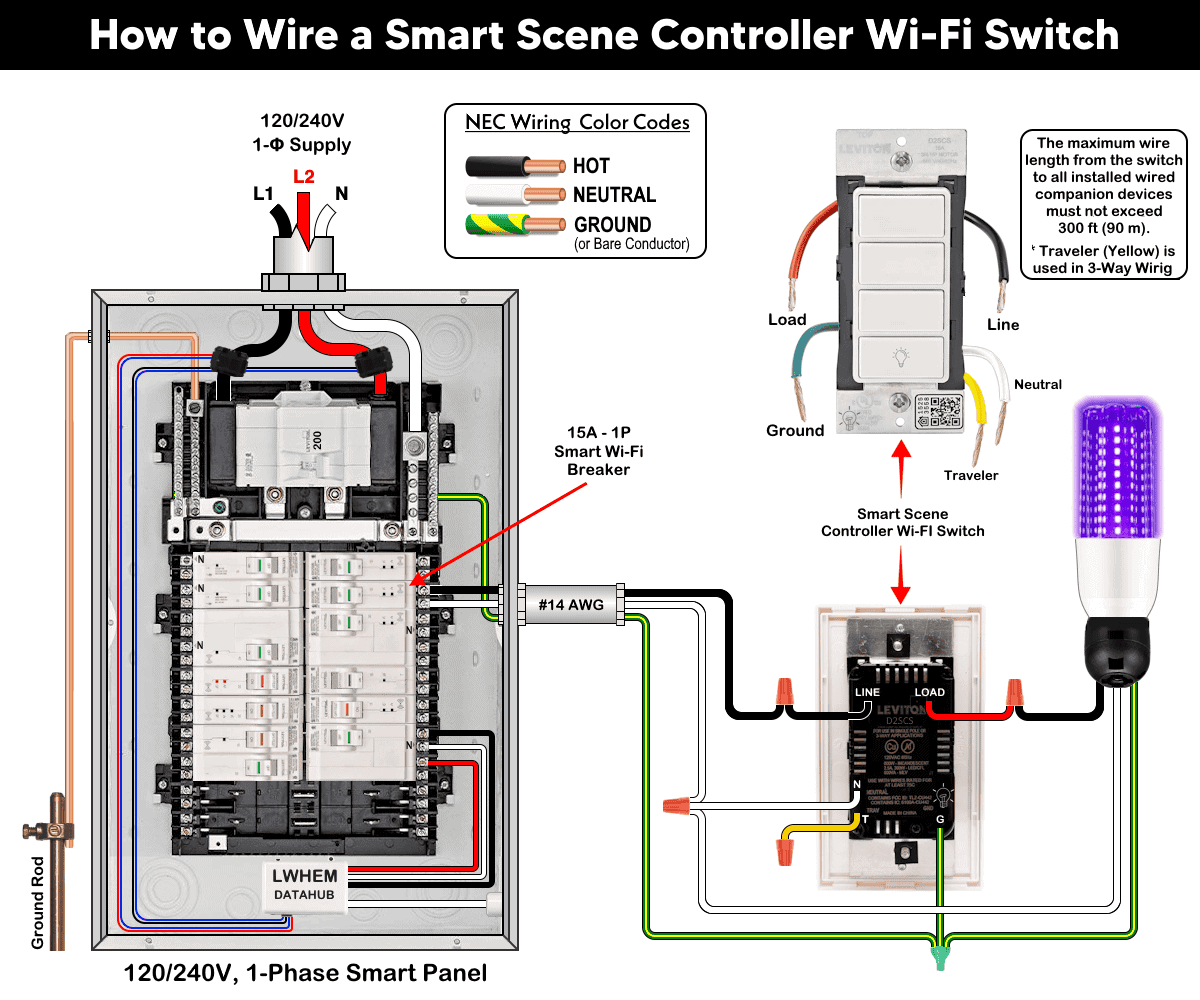
Wiring Connections of Smart Scene Controller Switch by Leviton
For single-pole installation, connect the switch wires one at a time using approved wire connectors:
- Connect Line (Hot) wire to the switch Line terminal (black wire).
- Connect Load wire to the switch Load terminal.
- Connect Neutral wires to the switch Neutral terminal (white wire).
- Connect Ground wire to the switch Ground (green wire).
- Cap the Yellow traveler wire (if not used).
The Yellow is a traveler wire and used in 3-way or multiway control when used with other smart devices.
Click image or open in a new tab to enlarge
Wiring Connections of Smart Scene Controller by Legrand
- Connect the black wire as Line (Hot) to the switch hot terminal.
- Connect the white wire as Neutral to the switch Neutral terminal.
- Connect green wire as Ground to the switch built-in Ground (green wire).
Click image or open in a new tab to enlarge
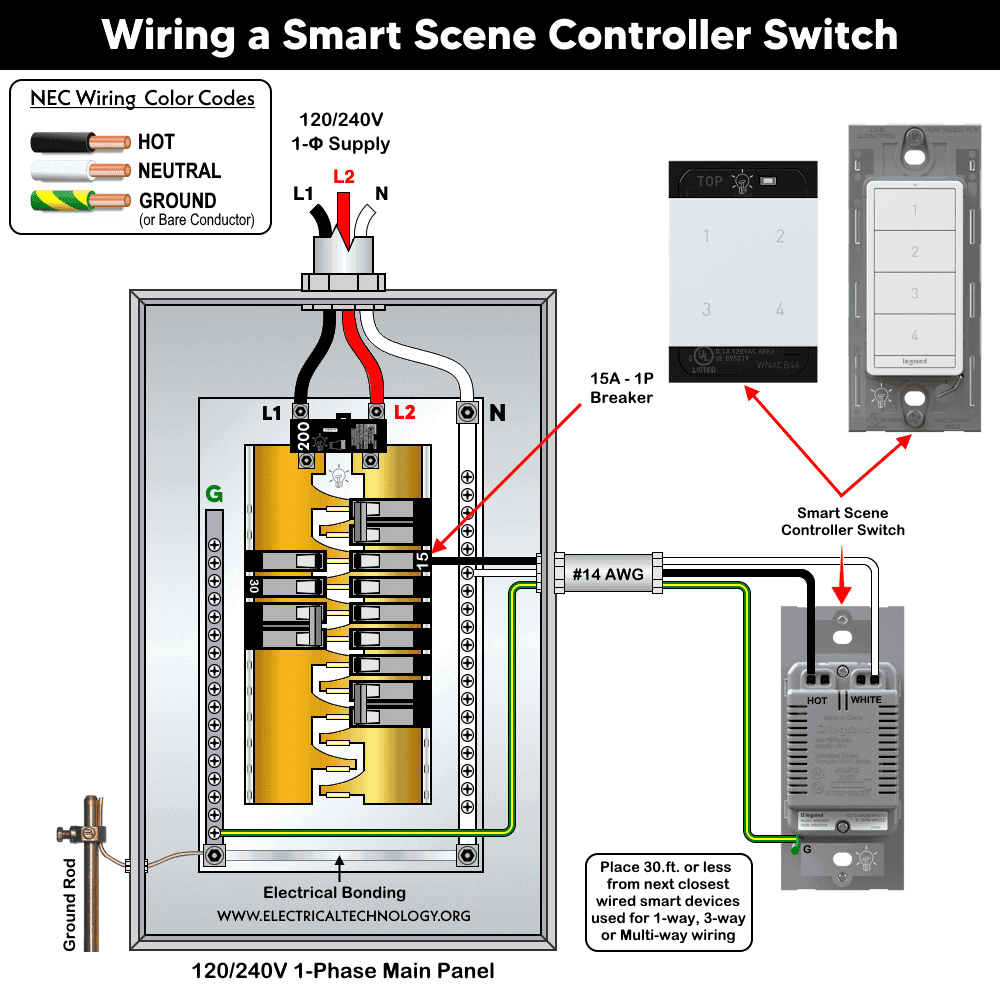
Note: There is no load wire, as the device does not directly control any connected load (e.g., lighting points). For Wi-Fi control via a mobile app, install the device within 30 ft (9 m) of the nearest wired smart device, which acts as the primary controller for lighting or other loads.
When installation is complete, carefully push the wires back into the wall box. Secure the smart switch using mounting screws up to 14-16 lbn – in. Finally, attach the wall plate and restore power at the breaker.
Pairing, Powering and Setup
Leviton Smart Scene Controller Switch
Press and hold the main (bottom) button for 7 seconds until the LED turns amber. Release the button and the LED will flash green which indicates the switch is in setup mode. To exit the setup mode, repeat the same process i.e. hold the bottom button for 7 seconds.
When in setup mode:
- Use the My Leviton app to configure scene buttons.
- Tap the “+” sign in the corner to add a device.
- Follow the onscreen instruction to connect to the Wi-Fi network and assign custom scenes.
- Integrate with voice assistants if required.
The controller can now operate both the connected load and multiple smart devices through programmed scenes. Verify that the connected load turns ON/OFF correctly.
Legrand Smart Scene Controller
To pair with system, install the Legrand Home + Control app to connect to home network or pair with gateway, add scene controller and other smart devices. To enter the setup mode, press gateway EZ button for 5 seconds until LED becomes solid green.
Now, open the app and tap the Settings menu. Select “add a device”, then select Remote or scene device and follow app instructions to connect the device to the gateway. The app then can be used to control your smart devices and connected lighting points.
For smart lighting control, follow this step-by-step guide for the Netatmo system to select your gateway, primary device, and add-on devices.
To enable Amazon Alexa, Google Home Voice Control Integration or or voice assistance to create scene for adorne & radiant® With Netatmo, follow this setup guide for automation.
Instructions & Precautions
- Make sure to disconnect the power supply by switching OFF the breaker in the main panel before doing any electrical work.
- The wire length from smart switch to other companion device should not exceed 300 ft (90 meters).
- Smart devices are only suitable for indoor use, and should not be used for medical applications.
Disclaimer:
- The author will not be liable for any losses, injuries, or damages from the display or use of this information or if you try any circuit in wrong format. So please! Be careful because it’s all about electricity and electricity is too dangerous. If you are unsure, contact a licensed electrician to do it according to the local area codes.
Resources:
Smart Devices Wiring Series
- How to Wire a Smart Switch in a 120/240V Load Center
- How to Wire 120/240V Smart Load Center with Smart Breakers
- How to Wire a Smart Breaker in a Smart 120/240V Panel
- How to Wire a Smart GFCI Breaker in a 120/240V Smart Panel
- How to Wire Smart AFCI/GFCI Breaker in a Smart Load Center
- How to Wire a 15A Wi-Fi Smart Outlet in a Smart Panel
- How to Wire 15A and 20A Wi-Fi Smart GFCI Outlets
- How to Wire Z-Wave Smart Switch, Dimmer & Fan Speed Controller
- How to Wire a Digital and Wi-Fi Smart LED Dimmer Switch
- How to Wire a Smart Switch Companion with a Smart Switch
- Wiring a Smart Dimmer Switch Companion with a Digital Dimmer
- How to Install a Wire-Free Smart Dimmer Anywhere Companion
Wiring Standard GFCI & Breakers
- How to Wire a 1-Pole Breaker
- How to Wire a 2-Pole Breaker
- How to Wire a 3-Pole Breaker
- How to Wire a 1-Pole GFCI
- How to Wire a 2-Pole GFCI
- How to Wire a 3-Phase, 3-Pole GFCI
- How to Wire a Tandem Breaker
- How to Wire GFCI Circuit Breakers
- How to Wire an AFCI Breaker
Wiring General Outlets & GFCI/AFCI Receptacles
- How to Wire an Outlet Receptacle? Socket Outlet Wiring Diagrams
- How to wire a GFCI Outlet?
- How to Wire an AFCI Outlet?
- How to a Wire 3-Way Combination Switch and Grounded Outlet?
- How to Wire a 15A – 125V Outlet – NEMA 5-15 Receptacle
- How to Wire a 20A – 125V Outlet – NEMA 5-20 Receptacle
- How to Wire a 15A – 250V Outlet – NEMA 6-15 Receptacle
- How to Wire a 20A – 250V Outlet – NEMA 6-20 Receptacle
- How to Wire a 50A – 125/250V Outlet – NEMA 14-50 Receptacle
Switches Wiring
- How to Wire Single Pole, Single Throw (SPST) as 2-Way Switch?
- How to Wire Single Pole, Double Throw (SPDT) as 3-Way Switch?
- How to Wire Double Pole, Single Throw Switch? Wiring DPST
- How to Wire Double Pole, Double Throw Switch? Wiring DPDT
- How to Wire Double Switch? 2-Gang, 1-Way Switch – IEC & NEC
- How to Wire 4-Way Switch (NEC) or Intermediate Switch as 3-Way (IEC)?
- How to Wire Auto & Manual Changeover & Transfer Switch – (1 & 3 Phase)
Sizing Breakers, Wires & Panels
- How to Size a Load Center, Panelboards and Distribution Board?
- How to Determine the Right Size Capacity of a Subpanel?
- How to Find the Right Wire Size for 100A Service 120V/240V Panel?
- How to Size a Circuit Breaker?
- How to Find the Proper Size of Wire & Cable In Metric & Imperial Systems
- How to Size a Breaker and Wires in AWG with EGC for Load?
- How to Size Service-Entrance Conductors and Feeder Cables?
- How to Size Feeder Conductors with Overcurrent Protection
- How to Size a Branch Circuit Conductors with Protection?
- How to Size Equipment Grounding Conductor (EGC)?
- How to Size Grounding Electrode Conductor (GEC)?
- How to Size Main Bonding Jumper (MBJ)?
- How to Size Motors FLC, HP, Voltage, Breaker Size and Wire Size
- What is the Correct Wire Size for 100A Breaker and Load?
- What is the Right Wire Size for 15A Breaker and Outlet?
- What is the Suitable Wire Size for 20A Breaker and Outlet?
Finding the Number of Breakers/Outlets in a Circuit
- How to Determine the Number of Circuit Breakers in a Panelboard?
- How to Find the Number of Outlets on a Single Circuit Breaker?
- How to Find Voltage & Ampere Rating of Switch, Plug, Outlet & Receptacle
- How to Calculate the Number of Fluorescent Lamps in a Final Sub Circuit?
- How to Calculate the Number of Incandescent Lamps in a Final Sub Circuit?
- How to Determine the Number of Lighting Branch Circuits?
- How to Determine the Number of Branch Circuits? – 3 Ways
- How to Find the Number of Lights on a Single Circuit Breaker?